axept® Application Introduction
The axept® application is a feature rich, fully-certified payment terminal API. You can use it either as a local Windows™ service, or as an application resident on a local network connected terminal.
Supported Products
axept® supports several different products in different ways. There are two integration methods, and two connection methods. The result is the table below.
| Product | Connections | Integration Methods | ||
|---|---|---|---|---|
| Local Network (IP) | Windows™ Service | Semi-Integrated | Fully-Integrated | |
| PAX S300 | Yes | Yes | - | Yes |
| PAX Q25 | Yes | Yes | - | Yes |
| PAX S800 | Yes | - | Yes | Yes* |
| PAX S900 | Yes | - | Yes | Yes |
PAX S300 Device

The S300 device has no attached printer, so is a Pin Entry Device (PED) as opposed to a terminal. This ensures that it is lightweight and cost-effective, but means it cannot be used in Semi-Integrated mode as this usually requires the Terminal to print out the cardholder receipts.
PAX Q25 Device
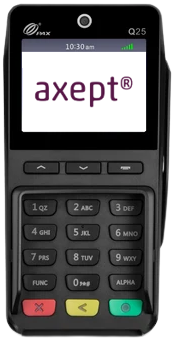
The Q25 is an updated version of the S300 device, and likewise has no printer. It utilises the latest P2PE standards as well as being slightly faster. It is also available for Fully-Integrated only for the same reasons as the S300.
PAX S800 Device

The S800 device has an attached printer, and connects using Ethernet ONLY. It is a countertop terminal, and will typically be used where Semi-Integration is desired but portability is not required such as a traditional till setting. The S800 can be used in Fully-Integrated mode, but as the printer has no use in this mode it is not advisable, and either the S300 or Q25 are instead recommended.
PAX S900 Device

The S900 device is a portable Wifi/GPRS terminal, but when integrated with a till it must use the local network so GPRS functionality is only useful as a contingency. With an attached printer, and a long-lasting battery, it provides a versatile solution. Note that in Fully-Integrated mode, receipt printing will be handled by the POS printer which may be in a different location to the terminal.
Semi Integrated v Fully Integrated
- Semi-Integrated
- Fully Integrated
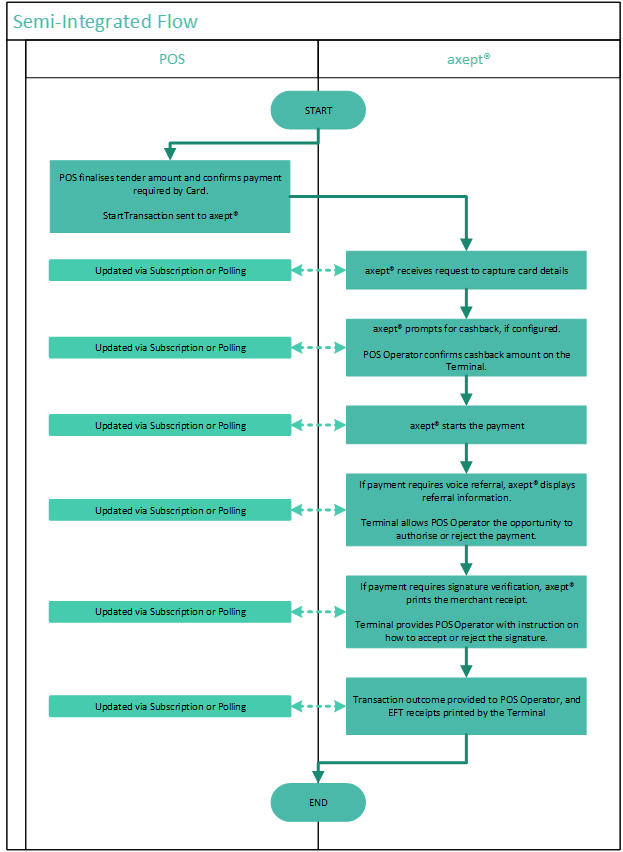
In this configuration, the EPOS provides the details required to start a transaction, and once started all other prompts are catered for by the axept® solution using the axept® UI. The integrated POS solution can monitor the progression of the transaction through status updates from Transaction Manager (via polling or publish and subscribe). Receipts are also handled by the axept® solution.
This approach allows the integrator to minimise the amount of integration work that they need to do whilst giving full access to the functionality available. Semi-Integrated eliminates a variety of issues such as miss-keying and of course saves time, but crucially provides the merchant with almost all of the benefits of a fully integrated solution without the need to complete a full and thorough integration.
Benefits of Semi-Integrated
- Simplest integration flow which allows for a quick integration to be completed.
- A good starting point that can then be built upon and lead to a fully integrated solution.
- Any industry mandated changes to display/receipt contents will be handled by Optomany without causing issues to the integration.
Semi-Integrated Considerations
- The operator needs to interact with both EPOS and the axept® solution in certain cirumstances.
- Inability for the EPOS to make use of axept®’s split transaction/payment(s) functionality.
- When compared to the full integration, semi-integrated has the potential to be a less seamless user experience for transaction processing.
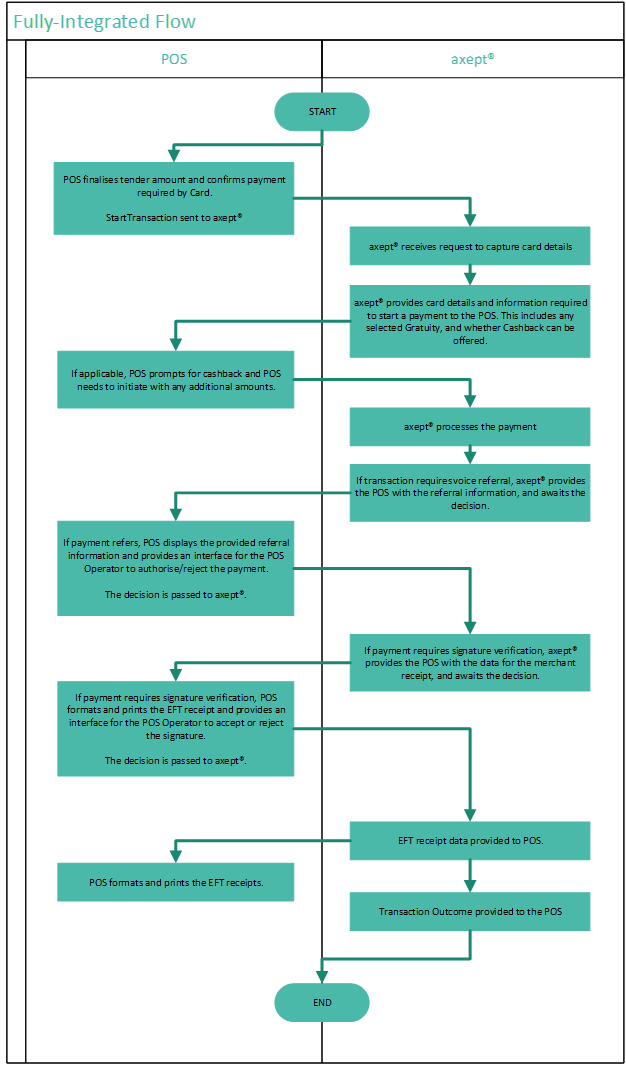
In this configuration, all the merchant driven functionality is governed by the POS. There are no Optomany provided prompts to the card acceptor and the POS is required to print the EFT recepts. This requires the most development by the integrator to ensure that they cater for every possible scenario but allows for the integrator to control the user experience.
Benefits of Fully Integrated
- The EPOS can determine the user experience for all payment methods therefore retaining control of the entire transaction process.
- Less chance of operators miskeying during referral, cashback and signature verification scenarios.
- More control over receipt format.
- Integrators can make use of multiple payments under a transaction. The benefit of using axept® for splitting payments is the ability to cancel the transaction after successful payments have been completed which will then reverse the authorised payments. With the traditional model of EPOS handling the multiple tenders, this scenario would require refunds for each successful payment.
Fully Integrated Considerations
- The integration needs to be thoroughly developed and tested to ensure it caters for all possible scenarios. This can result in a lengthier integration development phase than semi-integrated.
- The EPOS would need to be updated to cater for any mandated changes for receipts/terminology displayed to EPOS operator.
Transaction Flow Comparison
- Semi-Integrated
- Fully Integrated
Phased Development
A phased approach to development can be completed and is recommended. A successful Semi-Integration, using the S900 Terminal, could be adapted afterward to a more comprehensive Full Integration using the Q25, allowing you to deploy a solution quickly and recover development costs quickly. You can also take inspiration from the already certified prompts the Semi-Integration solution uses, and the compliant way that it prints receipts, to ease the development overhead for Fully Integrated.
It is possible to use an S300 or Q25 in Semi-Integrated mode IF you have completed the work required to print receipts via a separate printer.